

Delivery and recovery
Every status rChat shows under a message is meant to be true: it never says a message arrived unless the other phone said so.
Message status
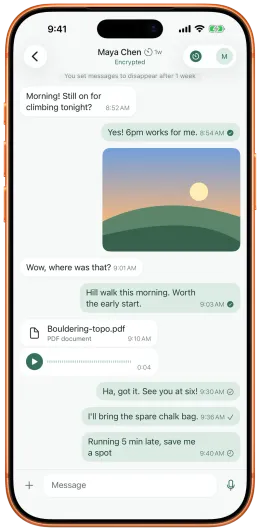
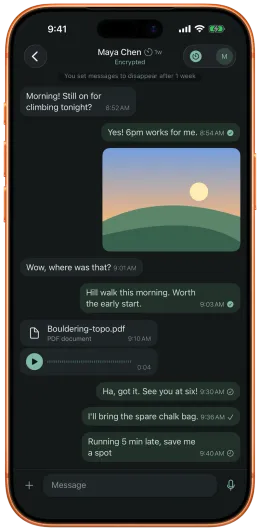
Section titled “Message status”| Status | Icon | What it means |
|---|---|---|
| Sending | clock | The message is saved on your phone and on its way. The relay has not acknowledged it yet. |
| Sent | tick | The relay took it: it has handed it to your contact’s connection, or holds it until their phone next connects. This is not proof that it arrived. |
| Delivered | tick in a circle | Your contact’s phone has stored it. |
| Read | filled tick in a circle | Your contact opened it. |
| Not delivered | exclamation mark | Your contact’s phone reported that it could not read this message. |
| Not confirmed | clock | The relay’s acknowledgement did not arrive in time. The message may have arrived, and a later Delivered or Read still updates it. Tap it to send it again; it may arrive twice. |
| Failed to send | exclamation mark | rChat gave up before the relay took it, for example because the contact is blocked or their keys were refused. |
Delivered and Read come from end-to-end encrypted receipts sent by your contact’s phone. The relay cannot read or forge them. They arrive a moment later, in small batches, so a message can show Sent briefly before it shows Delivered. Delivered means the message was stored on their phone, not just received: if their phone crashed before storing it, you see Not delivered instead of a false Delivered.
Once a message is Delivered or Read it never goes back to an earlier status.
Resend and Resent
Section titled “Resend and Resent”When a contact’s phone could not read some of your messages, rChat tells you in the conversation.
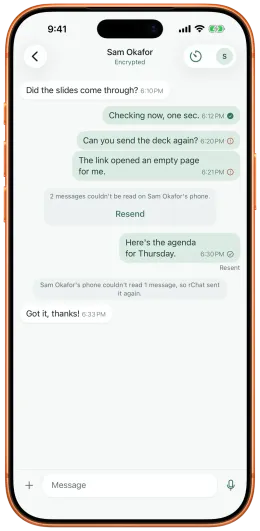
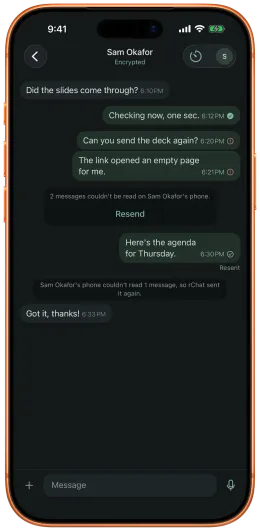
- Resent. If rChat could safely send the messages again by itself, it did, and each one shows a quiet Resent under it. A row in the conversation says, for example, “Sam’s phone couldn’t read 1 message, so rChat sent it again.”
- Resend. Otherwise the messages show Not delivered, and a row says, for example, “2 messages couldn’t be read on Sam’s phone.” Tap Resend to send them again. Resend is offered only for a contact whose keys haven’t changed, and nothing is sent until you tap.
A resent message goes out with the same message id as the original, so if the first copy did arrive after all, your contact’s phone shows it only once.
Your contact sees a matching row on their side: “{N} messages from {name} couldn’t be decrypted on this phone. {name} has been told, so they can resend them.”
App restarts
Section titled “App restarts”rChat saves each conversation’s encryption state on the phone, sealed with a key that only this phone can use. So:
- Restarting rChat, a crash, or iOS closing the app in the background loses no message that the relay accepted, as long as the phone’s own storage survives, except messages the relay was handing over at that very moment (see Limits). Messages already received stay, and messages still waiting at the relay can be read when you come back.
- A message that had not yet left your phone is sent when the app is back. That is a first send, not a resend, so it shows no Resent marker.
The saved state is excluded from device backups and cannot be opened on another phone, so a restored or new phone starts without it and goes through the recovery below.
Reconnecting, and contacts who are offline
Section titled “Reconnecting, and contacts who are offline”Since rChat 2.0.0 (protocol v3), two phones that already have a conversation reconnect with a fresh secure session every time either comes back online, matched at the relay by a code that changes every day and at every reconnect (see blinded pairing). This is automatic. What it means for delivery:
- Messages in flight survive a reconnect. A message that left your phone but was not yet acknowledged is sent again, unchanged, on the new session, so it is never lost to a dropped connection and never shown twice.
- Messages sent while the conversation is open reach the relay, which holds them for your contact if they have gone offline (at most 72 hours) and hands them over when they come back. They show Sent.
- Messages written while the conversation is closed wait on your phone. If you reopen rChat while your contact is offline, the conversation can only be opened again once you are both online. Until then a new message stays Sending on your phone; it is sent as soon as you are both connected, with no action from you.
- Right after adding someone, if the person who asked first closes rChat straight away, before the other side’s first reply, reconnecting can take a few minutes (up to about 3–4).
- While rChat is closed, your phone still collects messages the relay holds for you from time to time, and alerts you; see Notifications. Delivered receipts for those messages are sent the next time you open rChat.
When a contact reinstalls or changes phone
Section titled “When a contact reinstalls or changes phone”If your contact reinstalls rChat, or moves to a new phone, their phone has lost the encryption state for your conversation. Messages you sent under the old state can no longer be read there. This is by design: nothing can decrypt them without that state.
When your contact’s app is back, the two phones set up a new secure session automatically. Inside that new session, their phone tells yours which messages it could not read. Then:
- Automatic resend. Your phone sends those messages again by itself, and they show Resent, only when the message is signed by your contact’s device key, a key held in their phone’s secure hardware that you pinned from their code (a scan in person, or the paste that first added them). It also requires that nothing about their keys has changed since you sent the messages. A same-phone reinstall keeps the device key, so this is the usual case.
- Tap to resend. If your contact is on a new phone, they have a new device key that you have not pinned. Your messages then show Not delivered, and you tap Resend. This continues until you scan their code again, in person, which pins their new device key.
- After a key rotation, nothing is resent automatically. You see how many messages may not have arrived and tap Resend if you trust the change.
- If their keys don’t match (the contact shows Keys don’t match), nothing can be sent to them until you scan their code again.
The relay cannot fake any of this. The notice that a phone lost its state exists only inside a session made with your contact’s pinned keys, and the automatic path also needs their device key’s signature. Someone who has stolen a copy of your contact’s account keys, but not their phone, cannot make your phone resend anything automatically.
If your contact’s phone started over but rChat cannot resend anything automatically and some of your recent messages have no receipt, you may see “{name}‘s phone started a new secure session with you. {N} messages may not have reached them.” with Resend. These messages keep their status, because they may have arrived.
Limits
Section titled “Limits”- 72 hours. Only messages sent in the last 72 hours, and never delivered or read, are resent automatically. Older ones show Not delivered with Resend.
- 50 a day. rChat resends at most 50 messages automatically to one contact in any 24 hours. Beyond that, the rest show Not delivered with Resend.
- Once. A message is resent automatically at most once.
- The relay’s queue. Messages for a contact who is offline are held by the relay for at most 72 hours (relays cannot be set to keep them longer), then deleted. If the relay refuses a message because the contact’s queue is full, it never shows Sent; rChat keeps it and sends it again later.
- A relay restart. The relay holds waiting messages in memory, so a relay restart loses the messages it was holding, unless its operator turned on encrypted persistence. You keep seeing Sent.
- A phone killed mid-download. If your contact’s phone is killed while the relay is handing it the messages that waited for it, those messages can be lost. You keep seeing Sent, which is true: the relay took them.
Messages in a conversation with a disappearing-message timer follow the same statuses until they are deleted; see Media and disappearing messages.
See the security model for what these guarantees rest on.